Db_map graphical interface
To run the Db_map graphical interface
-
Enter the following at the system prompt:
db_map -win
-or-
db_map
The Vgen-Db_map dialog appears with the Db_map tab selected, as shown in Figure 8.
Figure8 - Vgen-Db_map dialog
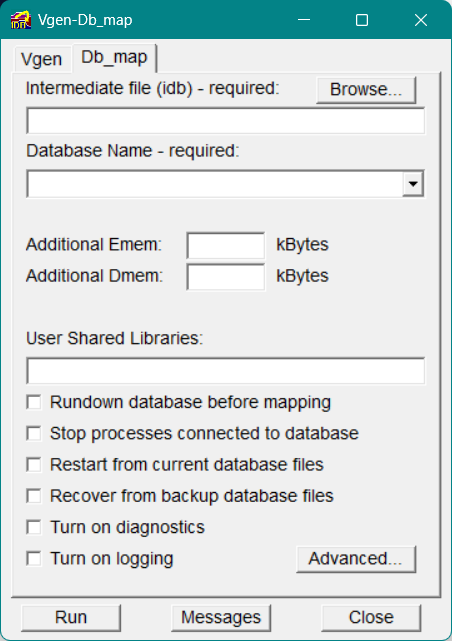
Intermediate file (idb)
Enter the name of the intermediate file, with extension .idb, that you want to map into memory. Or use the Browse button to select one from the list.
Database Name
Enter the name you want to use to identify the database once it has been mapped.
Additional Emem
Enter a value, in kilobytes, for the amount of additional event memory (emem) to reserve in the database. The amount of emem needed depends on how many processes are connecting to the database at one time and how many events are generated. This option will increase or decrease any emem value specified in Vgen. For more information on emem, refer to Event Memory (emem) in your Vsystem Vaccess Concepts Guide.
Additional Dmem
Enter a value, in kilobytes, for the amount of additional dynamic memory (dmem) to reserve in the database. This parameter should not be necessary in most cases, but, if used, will increase or decrease any dmem value specified in Vgen. For more information on dmem, refer to Dynamic Memory (dmem) in your Vsystem Vaccess Concepts Guide.
User Shared Libraries
Enter the name of the shared memory area that will be created by Db_map. This shared memory area, containing the event memory (emem) and dynamic memory (dmem), is created where the database is stored. The initial database values are then put into the database.
Rundown database before mapping
Select this option to run down any processes connected to the database before mapping it. This option does not cause the running processes to exit, however. You need to use the Stop processes connected to database option (below) to terminate the processes. (For more information on running down a database, see Db_rundown
Stop processes connected to database
Select this option, in conjunction with the Rundown database before mapping option (above), to terminate processes that are connected to the database. If the Rundown database before mapping option is not selected, this option has no effect.
Restart from current database files
If there are current database files, you can use this option to restart processes with these files; otherwise, this option has no effect. This feature is useful if you have to reboot the computer, but want to keep the database image as it was previously mapped.
Recover from backup database files
Select this option to use a copy of the database backup files as the current database.
Turn on diagnostics
Select this option to print out diagnostic messages during the mapping process.
Turn on logging
Select this option to create a log file named database.log in the Vsystem hostname log directory. This log file contains diagnostic information, including Db_map details, engine connections and disconnections, db_rundown details, and so on.
Messages Button
Use the Messages button at the bottom of the Vgen-Db_map dialog to access the Message List window.
Advanced
To display more advanced options, click the Advanced button in the lower right-hand corner of the Db_map tab. The Advanced Db_map Options dialog opens, as shown in Figure 9.
Figure9 - Advanced Db_map Options
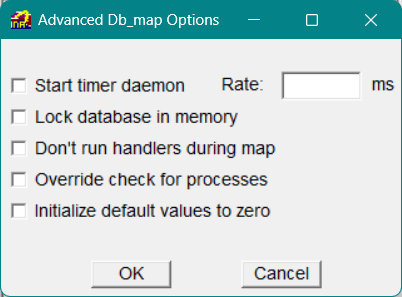
Start timer daemon
Select this option to start the timer daemon, which is used for delayed alarms. (For detailed information about the timer daemon, refer to Starting the Delayed Events Timer Daemon in your Vsystem Vaccess Concepts Guide.)
Rate
Enter a value, in milliseconds, for the timer daemon rate. This rate determines how frequently the timer daemon monitors delayed alarms.
Lock database in memory
Select this option to lock the database shared memory into memory. To use this qualifier, you need to have P_SYSOPS privilege on UNIX, or similar privilege on other platforms.
Note By locking the database into memory, you prevent the database from being swapped out to disk. A large, locked database, however, may affect the performance of your machine, because programs may have to be swapped more often.
|
Don't run handlers during map
Select this option to prevent the handlers from running during the mapping process.
Override check for processes
Select this option to prevent Db_map from checking for processes connected to the database during the mapping process.
Initialize default values to zero
If an initial value is not defined for a channel in its .adb file, and if the channel is not an array, binary, or string channel, select this option to put a value of 0 to the channel; any alarms, handlers, and conversions will be updated. If this option is not selected, the put to the channel will not occur, and any alarms, handlers, and conversions will not be updated. The channel, however, will still be initialized with a 0.
This option has no effect if an initial value is given for a channel.